URL Conditions
URL conditions target a campaign based on the address of the page a visitor is currently viewing. This category contains seven conditions and is the most frequently used part of Advanced Targeting, because it covers everything from a single exact page to an entire site section to traffic carrying specific UTM parameters.
URL conditions are found in the Campaign tab of the campaign editor sidebar, under Advanced Targeting. Open the Condition dropdown and select URL. Advanced Targeting requires ConvertForce Pro.
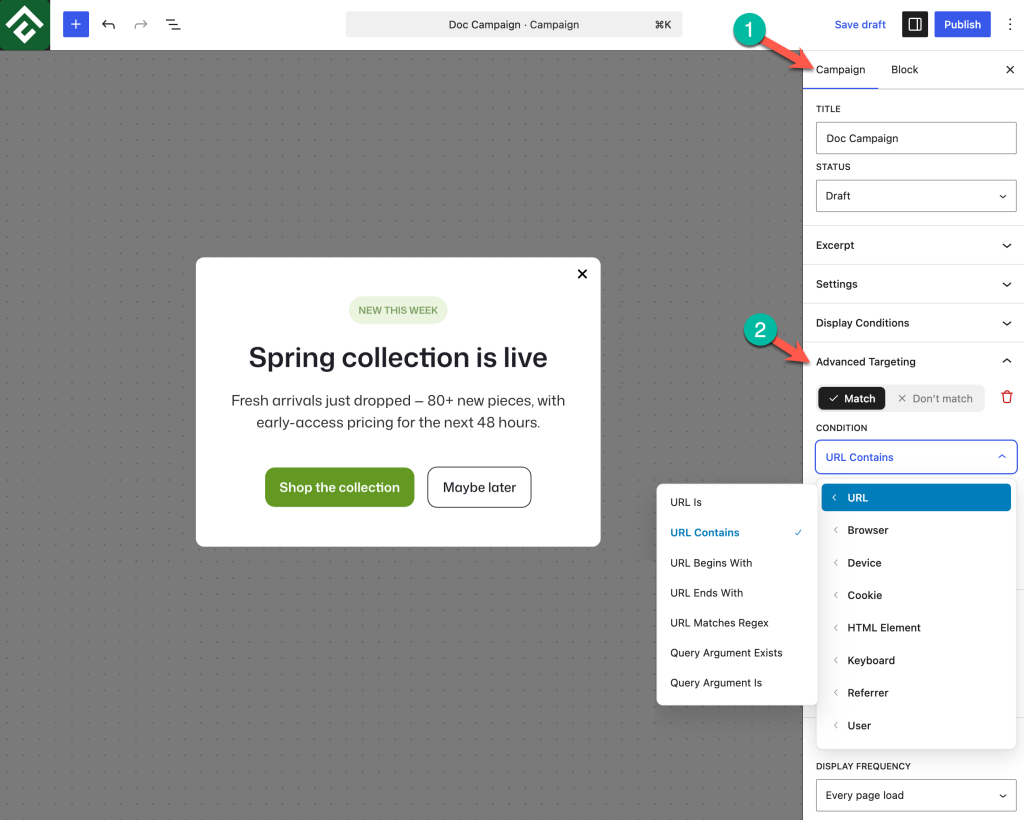
Available Conditions
URL Is
Matches when the current page address is exactly the value entered. Use this for single-page targeting where no other page should qualify. Because the match is exact, a value that differs by a trailing slash or a query string will not match.
Use case: A campaign that should appear on the pricing page and nowhere else, even though other pages contain the word “pricing” in their address.
URL Contains
Matches when the value appears anywhere in the current page address. This is the most flexible URL condition and usually the right first choice, because one value can cover a whole group of pages.
Use case: Enter /docs to run a support prompt across every documentation page at once, without listing them individually.
URL Begins With
Matches when the current page address starts with the value entered. More precise than Contains when a path fragment could also appear later in an address.
Use case: Enter a value beginning with /shop/ to target the shop section only, without matching a blog post whose address happens to include the word “shop”.
URL Ends With
Matches when the current page address finishes with the value entered. Useful for targeting a repeated final path segment across many parent sections.
Use case: Enter /checkout/ to target the checkout step regardless of which store section the visitor reached it from.
URL Matches Regex
Matches the current page address against a regular expression pattern. This handles rules that the simpler conditions cannot express in one step, such as matching several unrelated sections or matching a numeric pattern in a path.
Use case: A pattern such as /(pricing|checkout|cart)/ covers three commercial pages with a single condition, where Contains would need three separate conditions and could not express “any one of these”.
Regex is also the way around the AND behaviour of stacked conditions. Because stacked conditions must all be true, a single regex pattern is the correct tool whenever the rule needs “either this or that”.
Query Argument Exists
Matches when a named query parameter is present in the address, whatever its value. Enter the parameter name only.
Use case: Enter utm_source to show a campaign to all tagged marketing traffic at once, covering every source, medium, and campaign name without naming any of them.
Query Argument Is
Matches when a named query parameter is present and equal to a specific value. Use this when the campaign should respond to one particular source rather than tagged traffic in general.
Use case: Match on utm_campaign with a value of blackfriday so a matching offer popup appears only for visitors who clicked that specific campaign’s links.
Choosing Between URL Conditions and Display Conditions
Both features can target pages, and they suit different jobs:
- Display conditions are better for content that exists in WordPress as a page, post, category, or tag. They use searchable pickers, so nothing has to be typed and nothing breaks if a slug is misremembered.
- URL conditions are better for patterns rather than specific pieces of content, for query strings and UTM parameters, and for addresses generated by other plugins that do not appear in the standard page and post lists.
When a rule can be expressed either way, display conditions are the more maintainable choice because renaming a page does not break the rule.
Common Use Cases
Documentation help prompt. A slide-in offering support on help pages only. Set Match → URL Contains with a value of /docs.
Checkout free shipping bar. A bar promoting a shipping threshold at the point of purchase. Set Match → URL Contains with a value of /checkout.
Paid traffic welcome offer. A popup shown only to visitors arriving from tagged links. Set Match → Query Argument Exists with a value of utm_source.
Site-wide campaign with legal page exceptions. Keep the campaign’s display conditions set to the entire site, then add Don’t match → URL Contains with a value of /privacy and a second Don’t match → URL Contains with a value of /terms.
Section-wide campaign with one exception. Combine Match → URL Begins With for the section with Don’t match → URL Contains for the page to skip.
Frequently Asked Questions
Should the value include the full address or just the path?
For Contains, Begins With, and Ends With, a path fragment such as /pricing is the simplest value and works across staging and live domains. Avoid including the domain unless the rule specifically needs it.
Which condition should be used for a single page?
URL Is, or a display condition set to Singular with the page selected. Contains will also match any other address that includes the same fragment, so it is the wrong tool when only one page should qualify.
Can several URLs be targeted at once?
Yes, with URL Matches Regex and a pattern listing the alternatives. Stacking several URL Contains conditions will not work for this, because stacked conditions must all be true and one page cannot contain several different paths.
Can UTM parameters be targeted?
Yes. Use Query Argument Exists to match any tagged traffic, or Query Argument Is to match one specific parameter value.
Will the campaign still work if the page slug changes?
No. URL conditions match text, so renaming a page breaks any rule that referenced its old address. Review URL conditions after restructuring site sections.