HTML Element
HTML element conditions target a campaign based on what is present or visible on the page itself, rather than on the visitor or their device. This category contains three conditions, and it is the right tool whenever a campaign should follow a piece of content wherever it appears instead of following a list of addresses.
HTML element conditions are found in the Campaign tab of the campaign editor sidebar, under Advanced Targeting. Open the Condition dropdown and select HTML Element. Advanced Targeting requires ConvertForce Pro.
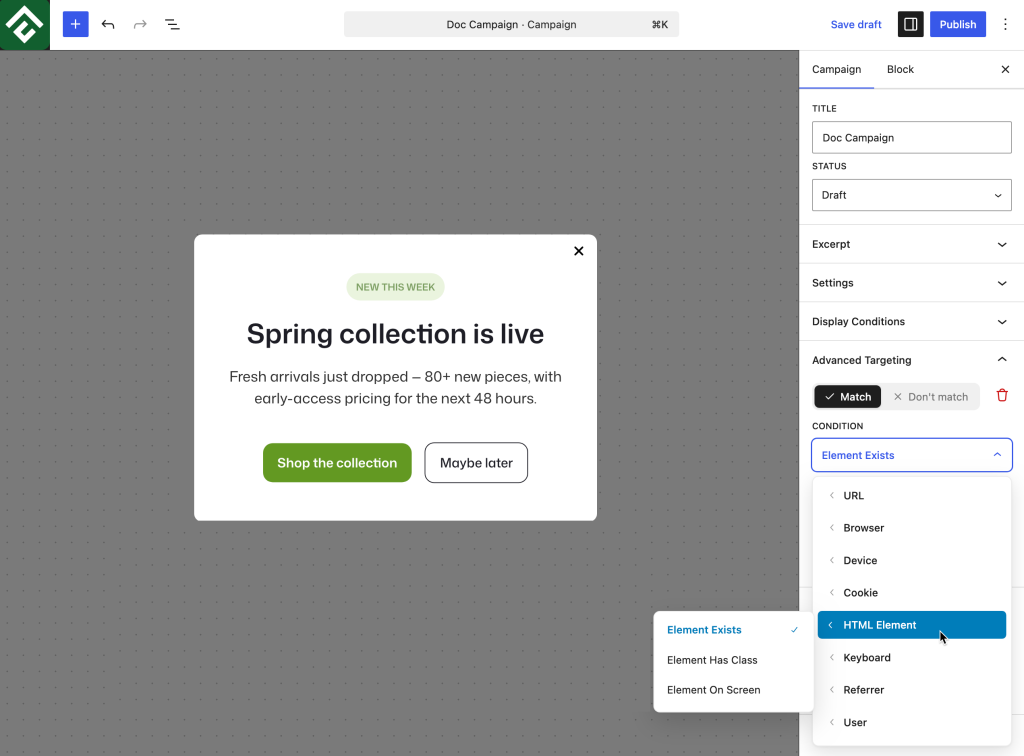
All three conditions are driven by a CSS Selector field, which identifies the element the rule applies to. Writing a selector is covered further down this page, and no code has to be edited to produce one.
Available Conditions
Element Exists
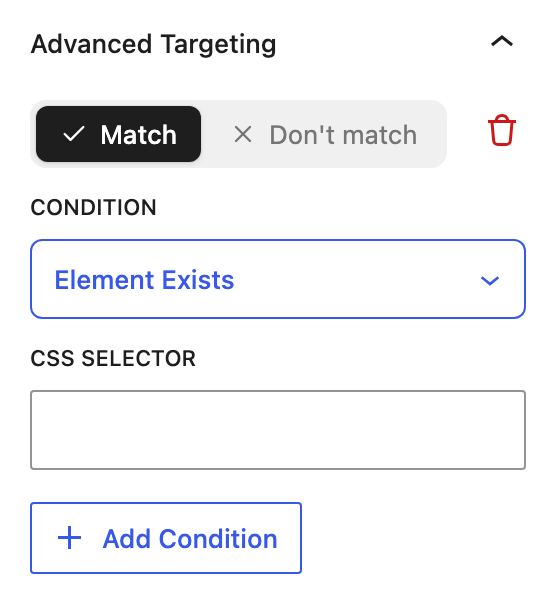
Matches when an element is present anywhere in the page, whether or not the visitor has scrolled to it. Selecting it reveals a single CSS Selector field.
This turns a page’s own content into the targeting rule. Instead of listing every address where a pricing table appears, the campaign follows the pricing table itself and automatically covers new pages that include it.
Use case: A discount popup that should appear on any page containing a pricing table, including pages added months later, with no rule to update.
Element Has Class
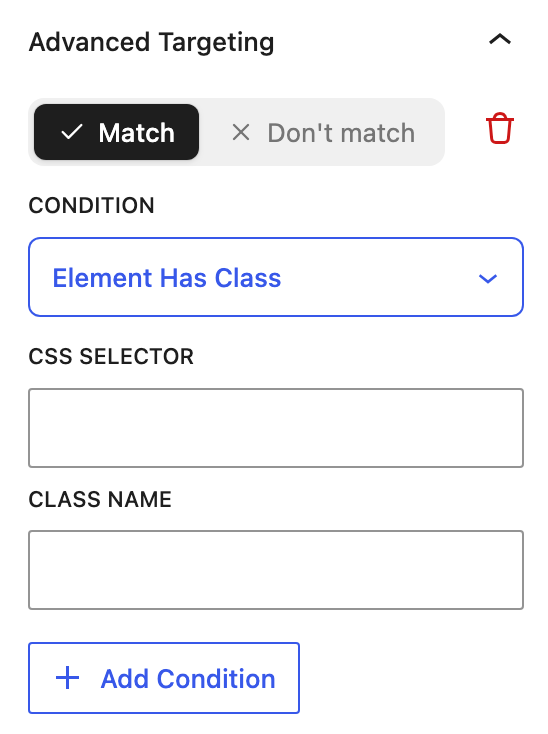
Matches when a specific element is carrying a specific class. Selecting it reveals two fields, CSS Selector and Class Name. The selector identifies which element to inspect, and the class name is what that element is checked for.
The distinction from Element Exists matters. Element Exists asks whether something is on the page at all. Element Has Class asks about the current state of an element that is already known to be there, which is useful because classes often change as a visitor interacts with a page. A menu, an accordion, or a body element frequently gains or loses a class depending on what the visitor has done.
Use case: Suppressing a slide-in while a mobile menu is open, by targeting the element that receives an open state class and setting the condition to Don’t match.
Element On Screen
Matches when an element is currently visible in the visitor’s viewport, rather than merely present in the page. Selecting it reveals a single CSS Selector field.
Because it depends on scroll position, this condition becomes true at the moment the visitor reaches the element, which makes it the most time-sensitive of the three.
Use case: A campaign that appears when a visitor reaches a specific section, such as showing a comparison offer once the pricing table itself comes into view.
Element On Screen vs. the Scroll Depth Trigger
Both features respond to a visitor scrolling, and the difference is what they measure:
- Scroll Depth is a trigger and measures a percentage of the page. Fifty percent means a different place on a short page than on a long one.
- Element On Screen is a targeting condition and measures a specific element. It refers to the same piece of content on every page, however long that page is.
Use Scroll Depth for general engagement, where the point is that the visitor is reading. Use Element On Screen when the campaign relates to one particular section and should appear alongside it.
Writing a CSS Selector
A selector identifies an element on the rendered page. The most common forms are a class, written with a leading dot, and an ID, written with a leading hash. The reliable way to find one is to inspect the element in the browser developer tools and copy the class or ID already on it.
The more maintainable approach is to add a purpose-made class rather than relying on markup a theme or plugin generates:
- Open the page containing the content the campaign should follow.
- Select the relevant block and open the Advanced panel in the block inspector.
- Add a descriptive class in Additional CSS class(es), ideally one that names the campaign it controls.
- Enter that class as the selector in the condition, with a leading dot.
A class added specifically for targeting will not change when a theme is updated or a plugin restructures its markup, which is the main risk with selectors copied from generated output.
Where several elements share a selector, treat the condition as asking whether any matching element satisfies it. Use a more specific selector when a rule needs to concern one element in particular.
Element Exists vs. Element Has Class
Both conditions can involve a class, and choosing between them depends on what is being asked:
- Element Exists with a class selector asks whether anything on the page carries that class. This suits marking pages as eligible for a campaign, where the class is added deliberately in the editor and never changes afterwards.
- Element Has Class asks whether one particular element currently carries a class. This suits reading the state of an element, where the class is added or removed by the theme or by the visitor’s own interaction.
For marking up pages editorially, Element Exists is simpler because it needs one field instead of two. Element Has Class earns its second field when the element is known and the question is about its state.
Common Use Cases
Content-driven campaign targeting. Add a marker class to a block on every page that should receive a campaign, then set Match → Element Exists against it. New pages join the campaign by being edited, with no settings change needed.
Section-aligned offer. Set Match → Element On Screen against a pricing or comparison section so the campaign appears exactly when the visitor reaches it.
Avoid duplicate messaging. Set Don’t match → Element Exists against an on-page signup form, so a signup popup never competes with a form already in the content.
Respect an open menu or overlay. Set Don’t match → Element Has Class against the element that receives an open state class, so a campaign does not appear on top of something the visitor has just opened.
Follow a shortcode or embed. Set Match → Element Exists against the wrapper element a shortcode or embed renders, so the campaign appears on every page using it without maintaining a page list.
Frequently Asked Questions
What is the difference between Element Exists and Element On Screen?
Element Exists only requires the element to be somewhere in the page. Element On Screen requires the visitor to have scrolled it into view, so it depends on their scroll position.
Why does Element Has Class need two fields?
The selector identifies which element to inspect, and the class name is what that element is checked for. This makes it possible to ask about the state of one known element rather than searching the whole page.
Do these conditions require writing code?
No. They need a CSS selector, but adding a class to a block through the block inspector’s Advanced panel is enough, and nothing has to be written or edited in a code file.
Should the selector include a dot or a hash?
Yes, in the CSS Selector field. A class needs a leading dot and an ID needs a leading hash, in the same form used in a stylesheet. The Class Name field in Element Has Class is a plain class name rather than a selector.
What happens if the element is added by JavaScript after the page loads?
Test this case before relying on it, since the result depends on whether the element is present at the moment the condition is evaluated. Elements rendered in the page’s initial markup are the safer choice.
Can an element inside the campaign itself be targeted?
Avoid this. A condition that depends on the campaign’s own markup creates a circular rule, since the element only exists once the campaign has already displayed.
Will a theme update break these conditions?
It can, if the selector references markup the theme generates. Using a class added deliberately through the block inspector avoids this, because nothing else depends on that class.