Cookie Conditions
Cookie conditions target a campaign based on the cookies present in a visitor’s browser. This category contains two conditions, and it is the most open-ended part of Advanced Targeting, because any cookie set by WordPress, another plugin, or a third-party tool becomes a targeting signal without ConvertForce needing to integrate with that tool directly.
Cookie conditions are found in the Campaign tab of the campaign editor sidebar, under Advanced Targeting. Open the Condition dropdown and select Cookie. Advanced Targeting requires ConvertForce Pro.
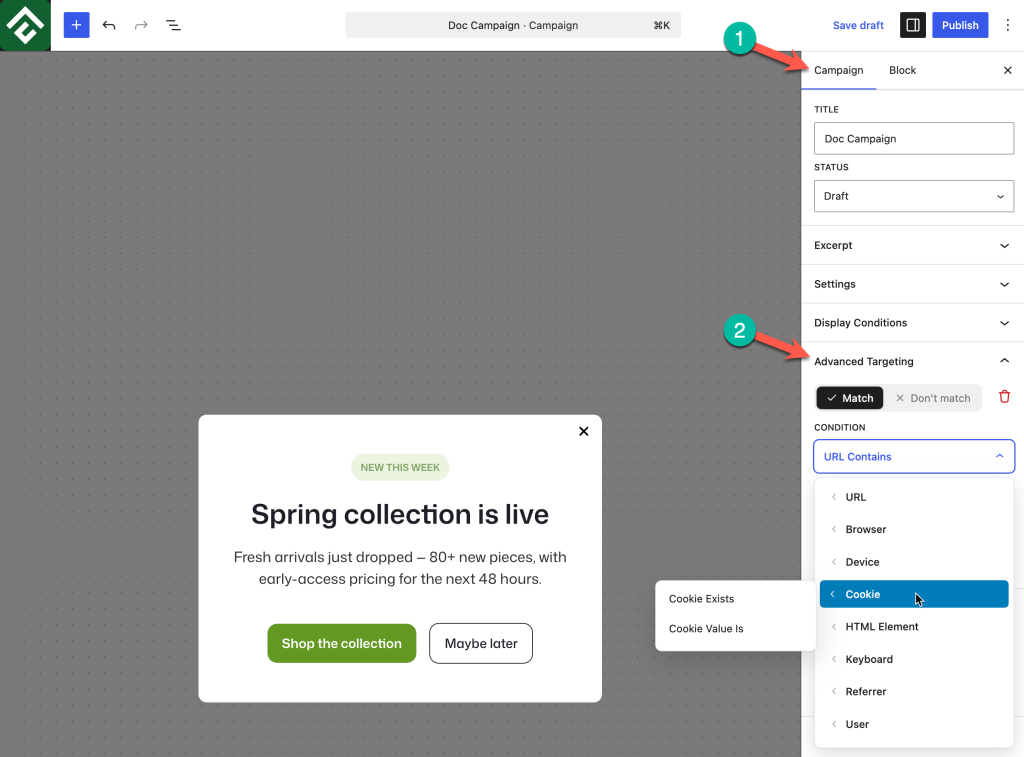
Available Conditions
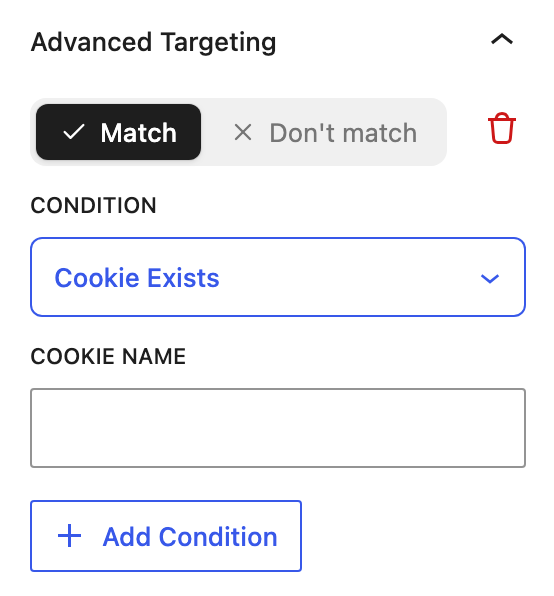
Cookie Exists
Matches when a cookie is present in the visitor’s browser, whatever it contains. Selecting it reveals a single Cookie Name field.
Presence is often all that matters, because many cookies exist purely as a marker that something has happened. This makes Cookie Exists the simpler and more durable of the two conditions, since it keeps working even if the contents of the cookie change format later.
Use case: Suppressing a newsletter popup for visitors who already subscribed, by setting Don’t match → Cookie Exists against the cookie the signup process leaves behind.
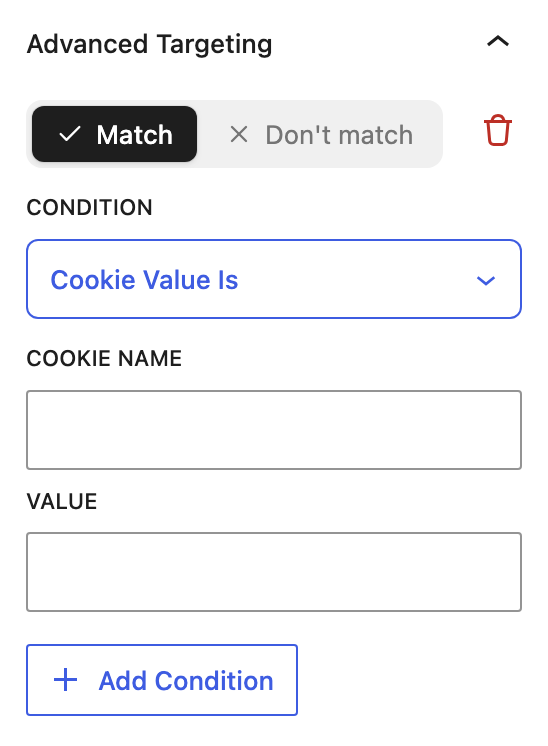
Cookie Value Is
Matches when a cookie is present and its contents equal a specific value. Selecting it reveals two fields, Cookie Name and Value. Enter the name of the cookie in the first and the exact contents to match in the second.
Use this when one cookie carries several possible states and the campaign should respond to only one of them. Because the comparison is for an exact match, it suits cookies that hold a short, predictable value rather than ones storing structured data.
Use case: A cookie recording a visitor’s plan tier, where an upgrade prompt should reach visitors on the entry tier and no one else.
Finding a Cookie Name
Both conditions need the exact cookie name, which can be read directly from the browser:
- Visit the site in a state where the cookie should exist, for example after logging in or completing the action being targeted.
- Open the browser developer tools.
- Go to the storage or application panel and select Cookies.
- Choose the site’s domain to list every cookie with its name and current value.
Copy the name rather than retyping it. Cookie names are case sensitive, and a single character difference means the condition never matches, which is difficult to diagnose afterwards because nothing appears to be wrong.
Reading the value at the same time is worth doing even when only Cookie Exists is needed. A cookie that turns out to hold a long encoded string is a poor candidate for Cookie Value Is, and seeing that early avoids building a rule that cannot work.
Choosing Between the Two Conditions
Use Cookie Exists whenever presence alone answers the question. It survives changes to how the cookie’s contents are formatted, and it needs one field instead of two.
Use Cookie Value Is only when a single cookie holds several states and the campaign needs to tell them apart. A cookie storing a plan name or a language code fits. A cookie storing a session token or a JSON object does not, because its contents differ for every visitor.
Cookies That Are Not Suitable for Targeting
Not every cookie in a browser makes a workable targeting signal. Three kinds are worth avoiding:
- Cookies with changing names — WordPress authentication cookies include a hashed suffix that differs per site, so their full name is not stable or predictable. Use the Is Logged In condition in the User category for login state instead, which is designed for exactly this and needs no configuration.
- Cookies holding per-visitor values — Session identifiers and tokens are different for everyone, so Cookie Value Is can never match them. Cookie Exists still works if the goal is only to detect that a session exists.
- Cookies not readable by the browser — Some cookies are flagged so that only the server can read them, which keeps them hidden from scripts running on the page. Test any rule built on an unfamiliar cookie before relying on it.
Common Use Cases
Hide a campaign from existing customers. If a store or CRM plugin sets a cookie for known customers, set Don’t match → Cookie Exists with that cookie name so acquisition campaigns skip people who have already bought.
Respect consent choices. If a consent plugin records a visitor’s preference in a cookie, reference it so marketing campaigns are held back until consent has been given.
Coordinate with another tool. When a separate tool sets a cookie on completing an action, target that cookie so two systems do not ask the same visitor for the same thing.
Segment by plan or tier. Set Match → Cookie Value Is against a cookie that stores a plan name, so upgrade messaging reaches only the tier it applies to.
Suppress a campaign after a custom action. Where another tool or a small snippet sets a cookie when a visitor completes something, use Don’t match → Cookie Exists to retire the campaign for that person without affecting anyone else.
Frequently Asked Questions
Does ConvertForce set the cookies used by these conditions?
No. Cookie conditions read cookies that already exist in the visitor’s browser. The cookie has to be set by WordPress, another plugin, or a third-party tool before it can be targeted.
Which condition should be used, Cookie Exists or Cookie Value Is?
Cookie Exists whenever presence alone answers the question, because it survives changes to the cookie’s contents. Cookie Value Is only when one cookie holds several states that need telling apart.
Are cookie names case sensitive?
Yes. Enter the name exactly as it appears in the browser developer tools.
Does Cookie Value Is match part of a value?
No. It compares the whole value, so the Value field has to contain the complete contents of the cookie. Where only part of a value is predictable, Cookie Exists is the workable alternative.
How can a campaign be targeted to logged-in visitors using a cookie?
Use the Is Logged In condition in the User category rather than a cookie. WordPress authentication cookie names contain a hash that varies between sites, so a cookie rule would not be portable even where it worked.
What happens if the visitor clears their cookies?
The condition stops matching, because the cookie no longer exists. Any campaign depending on a cookie should behave sensibly for a visitor arriving with none, since that describes every first-time visitor.
Can these conditions be used for privacy compliance?
They can read a consent cookie set by a consent management plugin, which is a practical way to hold campaigns back until consent exists. ConvertForce does not manage consent itself, so a dedicated consent plugin is still required.